扩展1:在 AWS 上部署 Magento
更多的自动部署
通过之前的实验,您或许已经体会到云上构建应用程序的优势,例如可靠性、稳定性、低成本、安全性。如果您在应用层希望有更多便捷的模板可以直接使用,您可以访问 AWS quickstart 或 AWS Samples进行检索。例如:
AWS Serverless Ecommerce Platform
Serverless Shopping Cart Microservice
下面,我们实验流行的电商开源框架 Magento 同样进行快速部署示范
自动在 AWS 云上部署 Magento Open Source
Magento 是一个用于电子商务网站的非常流行的开源内容管理系统。这种自动部署可构建用于运行 Magento 以及可选示例数据的集群,让您可以使用自定义主题并查看网络商店。
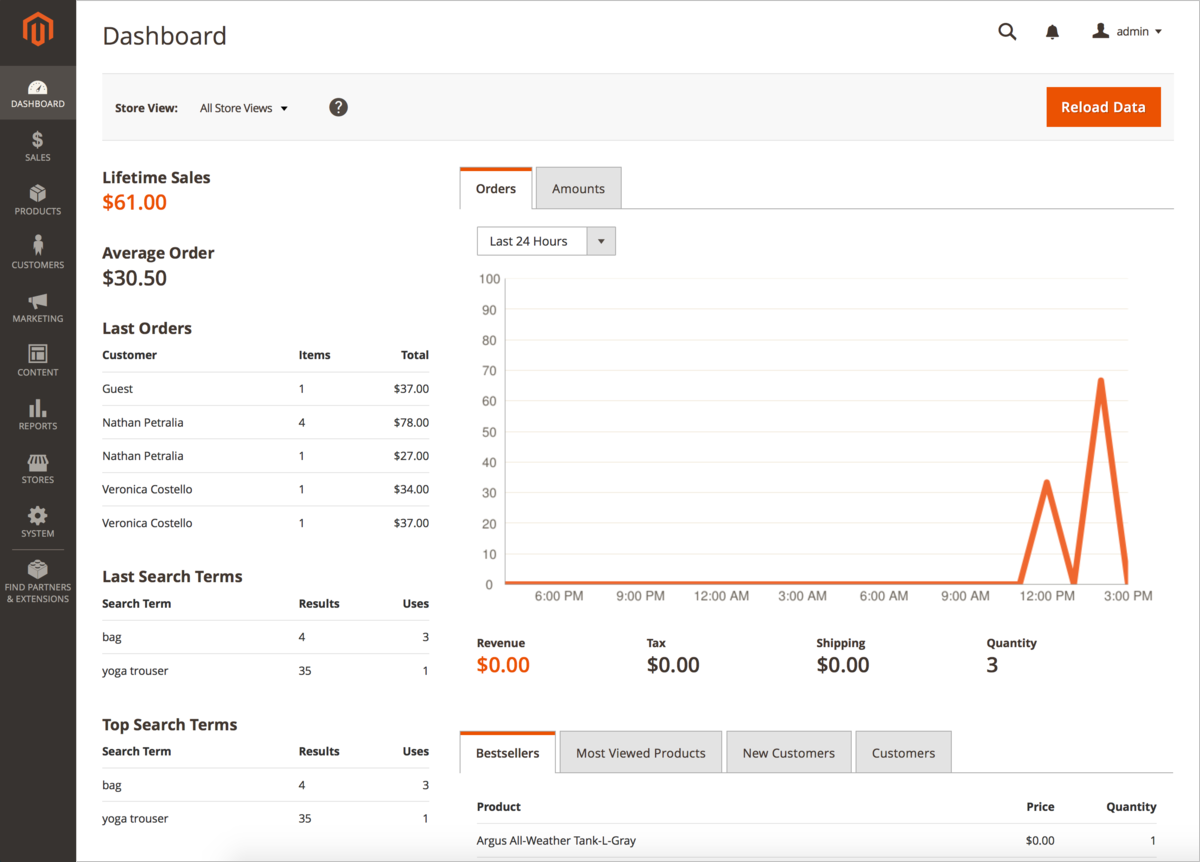
您可以在Magento 2 Demo查看magento的demo
开始部署
扩展实验课指导您在 AWS 上构建 Magento 环境,请遵循部署指南中的说明操作。部署过程包括以下步骤:
-
如果您还没有 AWS 账户,请访问 https://aws.amazon.com 进行注册。
-
下载 Magento 软件。
-
启动此 Quick Start。每次部署大约需要 30-60 分钟。有以下两种方案可供选择:
-
您可以点击以下的 Launch Stack ,这样将直接跳转到首选区域的堆栈创建页面
| 账户所属 | 实验模板 |
|---|---|
| 部署到新 VPC |  |
| 部署到现有 VPC | |
- 通过连接至 Magento 堆栈,访问 Magento 管理面板,以及测试 MySQL 连接性来测试该部署。
如果要自定义部署,您可以配置您的 Magento、数据库和 Amazon ElastiCache 设置,设置最低和最高的 web 服务器数量,然后自定义 CIDR 数据块大小和实例类型。
详细信息请参考 Magento Quick Start ,将带您逐步完成部署
架构说明
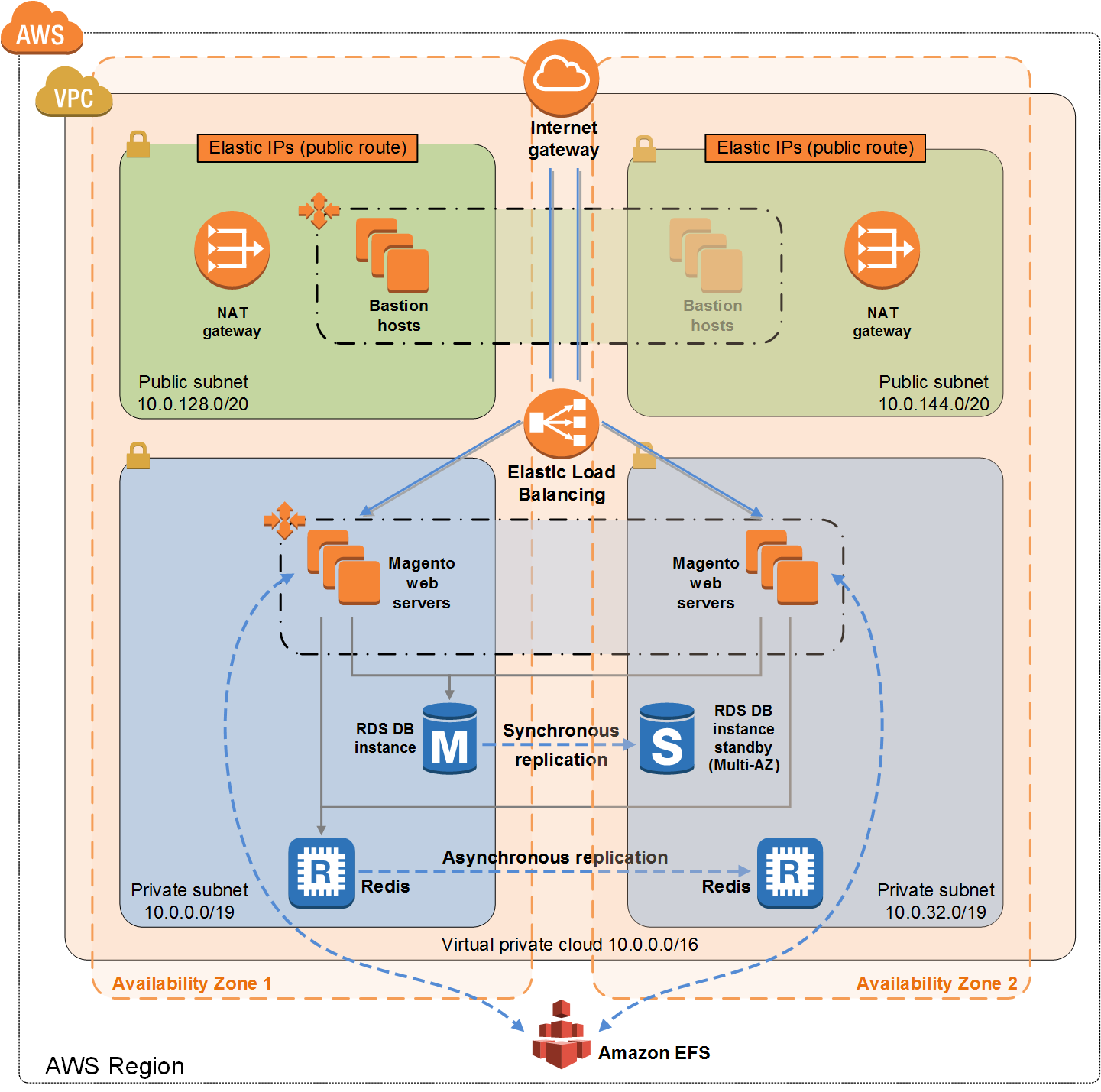
使用此 Quick Start 在 AWS 帐户上自动设置以下 Magento 环境:
-
一个跨两个可用区的Virtual Private Cloud (VPC),配置包含两个公有子网和两个私有子网。
-
在公有子网中,由堡垒主机提供对 Magento web 服务器的 Secure Shell (SSH) 访问。堡垒主机由跨多个可用区的 Auto Scaling 组维护,配置用于确保始终存在可用的堡垒主机。*
-
受 AWS 托管的网络地址转换 (NAT) 网关,部署到公有子网中并配置有弹性 IP 地址,用于实现出站连接。NAT 网关被用于对私有网络中启动的所有 EC2 实例实施互联网访问。
-
通过 Amazon RDS,在第一个私有子网中部署 Amazon RDS for MySQL 或 Amazon Aurora 数据库引擎。如果您选择多 AZ 部署,则在第二个私有子网中,会部署同步复制的第二个数据库。它提供高可用性,以及来自主数据库的内置自动故障转移。
-
私有子网中会启用带 Redis 缓存引擎的 Amazon ElastiCache 集群。
-
私有子网中启用的 Amazon EC2 web 实例。
-
Elastic Load Balancing 部署之后,用于自动在多个 web 服务器实例分配流量。
-
Amazon EFS 创建之后,自动安装到 web 服务器实例上,用于存储共享的媒体文件。
-
Auto Scaling 启用之后,可以需求突增时自动增加容量,在对流量需求低的时段降低容量。默认安装将设置基于 CPU 的低阈值和高阈值,以便向上或向下扩展实例容量。您可以在启动期间和部署后修改这些阈值。
-
一个具有精细权限的 AWS Identity and Access Management (IAM) 实例角色,用于访问部署过程所需的 AWS 服务。
-
适用于每个实例或函数的安全组,以限制仅访问必要的协议和端口。例如,仅限 Elastic Load Balancing 访问 Amazon EC2 Web 服务器上的 HTTP 服务器端口。安全组对 Amazon RDS DB 实例的访问也受到限制,只能访问 web 服务器实例。
-
将此 Quick Start 部署到现有 VPC 中的模板会跳过标有星号的任务,并提示您使用现有 VPC 配置。
Magento 组件
本Quick Start使用以下必备软件部署了Magento开源软件(v2.1.18或v2.3.2):
-
Operating system: Amazon Linux x86-64
-
Web server: NGINX
-
Database: Amazon RDS for MySQL 5.6 or Amazon Aurora
-
Programming language: PHP 7, including the required extensions
Quick Start 还可以选择部署Magento示例数据,使您可以尝试自定义主题并查看网络商店。如果您选择使用示例数据安装Magento软件,则快速入门将Amazon EFS文件系统作为驱动器安装在Web服务器节点内,并在Amazon EFS文件系统中安装通用媒体资产。
有关这些实用程序的更多信息,请参阅Magento网站-在服务器上安装Magento文档。
使用到的服务
The core AWS components used by this Quick Start include the following AWS services. (If you are new to AWS, see the Getting Started section of the AWS documentation.)
Amazon EC2
- The Amazon Elastic Compute Cloud (Amazon EC2) service enables you to launch virtual machine instances with a variety of operating systems. You can choose from existing Amazon Machine Images (AMIs) or import your own virtual machine images.
Amazon VPC
- The Amazon Virtual Private Cloud (Amazon VPC) service lets you provision a private, isolated section of the AWS Cloud where you can launch AWS services and other resources in a virtual network that you define. You have complete control over your virtual networking environment, including selection of your own IP address range, subnet creation, and configuration of route tables and network gateways.
AWS CloudFormation
- AWS CloudFormation gives you an easy way to create and manage a collection of related AWS resources, and provision and update them in an orderly and predictable way. You use a template to describe all the AWS resources (e.g., EC2 instances) that you want. You don’t have to create and configure the resources or figure out dependencies; AWS CloudFormation handles all of that.
Auto Scaling
- Auto Scaling helps maintain high availability and manage capacity by automatically increasing or decreasing the EC2 instance fleet. You can use Auto Scaling to run your fleet at optimal utilization by increasing instance capacity during demand spikes and decreasing capacity during down times.
Elastic Load Balancing
- Elastic Load Balancing automatically distributes incoming application traffic across multiple EC2 instances.
Amazon ElastiCache
- The Amazon ElastiCache service makes it easy to deploy, operate, and scale an in-memory data store or cache in the cloud. The service improves the performance of web applications by allowing you to retrieve information from fast, managed, in-memory data stores, instead of relying entirely on slower disk-based databases.
Amazon EFS
- Amazon Elastic File System (Amazon EFS) provides simple, secure, durable, highly scalable file storage for use with EC2 instances. This Magento deployment uses Amazon EFS to share and retrieve common media assets by web server instances.
Amazon RDS
- Amazon Relational Database Service (Amazon RDS) makes it easy to set up, operate, and scale a growing set of relational databases, including MySQL and Amazon Aurora, both of which are supported by the Magento Quick Start. With Amazon RDS, you can deploy scalable relational databases in minutes with cost-efficient and resizable hardware capacity.
IAM
- AWS Identity and Access Management (IAM) enables you to securely control access to AWS services and resources for your users. With IAM, you can manage users, security credentials such as access keys, and permissions that control which AWS resources users can access, from a central location.
Design Considerations
Magento is a robust e-commerce platform that can be deployed with a variety of options, depending on your needs. This Quick Start provides a great starting point for building your e-commerce solution rapidly with Magento on the AWS Cloud. The following sections discuss design considerations for large-scale deployments and options for optimizing performance.
Amazon Aurora and Amazon RDS for MySQL
By default, this Quick Start uses Amazon Aurora, but you can deploy Amazon RDS for MySQL instead by setting a template parameter during deployment. If you choose Amazon Aurora, but it’s not available in the selected AWS Region (please check the region table), you will not be able to launch the Quick Start.
Amazon Aurora is a MySQL 5.6-compatible relational database engine that combines the speed and availability of high-end commercial databases with the simplicity and cost-effectiveness of open source databases. It provides up to five times better performance than MySQL, and the security, availability, and reliability of a commercial database at one-tenth the cost. See the Amazon Aurora Pricing page for further details.
Amazon RDS deployments are preconfigured with a set of parameters and settings appropriate for the DB instance class you choose. Amazon RDS supports automatic software patching, database backups, backup storage for a user-defined retention period, and point-in-time recovery.
Amazon RDS supports three types of storage: Magnetic, General Purpose (SSD), and Provisioned IOPS (SSD). General Purpose (SSD) storage delivers a consistent baseline of 3 IOPS per provisioned GiB and provides the ability to burst up to 3,000 IOPS. To achieve a higher level of performance, consider using Provisioned IOPS (SSD) to provision from 1,000 IOPS up to 30,000 IOPS per DB instance. (Maximum realized IOPS may be lower.) You can provision up to 3 TiB storage and 30,000 IOPS per database instance. We recommend using Magnetic storage for small database workloads where data is accessed less frequently. Note that you can convert from standard storage to Provisioned IOPS storage on a running cluster. (There is a short availability impact on the servers.)
To enhance availability and reliability for production workloads, you should use the Multi-AZ deployment option. This provides an automated failover from the primary database to a synchronously replicated secondary database that is running in a different Availability Zone. This option also enables you to scale out beyond the capacity of a single database for read-heavy database workloads.
Amazon EC2 Web Server Instances
The deployment installs NGINX on EC2 instances running Amazon Linux x86-64. Elastic Load Balancing is used to automatically distribute the website load across these instances. In addition, all the instances are launched in an Auto Scaling group that dynamically manages the Amazon EC2 fleet. The deployment sets low and high CPU utilization thresholds to automatically scale the number of EC2 instances up or down depending on load. Default policy adds new instances when the CPU load exceeds 90% for 10 minutes, and removes instances when the CPU load drops below 70% for 10 minutes.
You can specify the maximum number of instances in the Auto Scaling group, and Auto Scaling ensures that your group never goes above this size. You can also specify the desired capacity, either when you create the group or at any time thereafter, and Auto Scaling will ensure that your group has the desired number of instances. These options are configurable during Quick Start launch.
The Quick Start supports a variety of EC2 instance types. We recommend that you benchmark the cluster to make sure you achieve the level of performance you need before starting a production deployment. For high availability, we recommend using at least two web server instances in different Availability Zones.
Amazon EFS
When you deploy Magento with this Quick Start, you can use the Magento archive (tar file) with sample Magento data. If you choose this option, the common media assets derived from the samples are stored in Amazon EFS.
Amazon EFS is a file storage service with a simple interface that enables you to create and configure file systems quickly and easily. Multiple EC2 instances can access an Amazon EFS file system at the same time, providing a common data source for workloads and applications running on more than one instance.
Amazon ElastiCache
Amazon ElastiCache is a web service that helps you deploy and operate an in-memory cache in the AWS Cloud. This Quick Start automatically deploys an ElastiCache cluster using the Redis caching engine. ElastiCache reduces the operational overhead involved in deploying a distributed caching environment, and provides a way to improve application load times. For more information, see the Amazon ElastiCache documentation.